


Lately, I keep getting prompted to create a passkey.
Google asks. Microsoft asks. Other apps and websites ask. And every time, I have the same thought: How is this actually different from a password?
I understand the pitch. Passkeys are supposed to be easier, safer, and eventually replace passwords altogether. But if I still have to unlock my phone, use Face ID, enter a PIN, or open a password manager, what exactly changed? That question sent me down the rabbit hole.
So let’s break down what passkeys are, how they work, and what to do when you’re asked to create one.
What is a Passkey?
What is a Passkey?
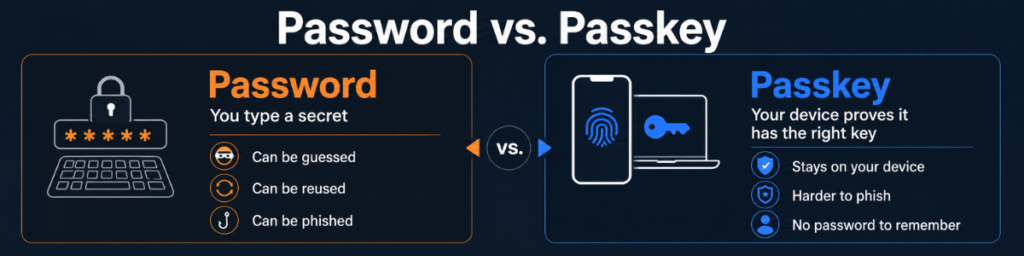
A passkey is a digital credential that lets you sign in without relying on a traditional password. Instead of typing in something you know, your device uses a secure cryptographic key to prove that you are the legitimate account holder.
In practice, that usually feels pretty simple. You may approve the sign-in with Face ID, a fingerprint, a PIN, or whatever you already use to unlock your device. Behind the scenes, though, something very different is happening.
With a password, the website is essentially asking you to provide the secret. With a passkey, the website is asking your device to prove that it holds the right key. Your private passkey stays with you, and the website gets only the proof it needs to verify your identity. The passkey itself may be stored on your phone or computer, or inside a password manager. Depending on the provider, it may also sync across your devices so you can use it in more than one place.
Why Are Passkeys Getting So Much Attention?
Password vulnerability is the main reason passkeys are getting so much attention: passwords are still one of the weakest parts of online security.
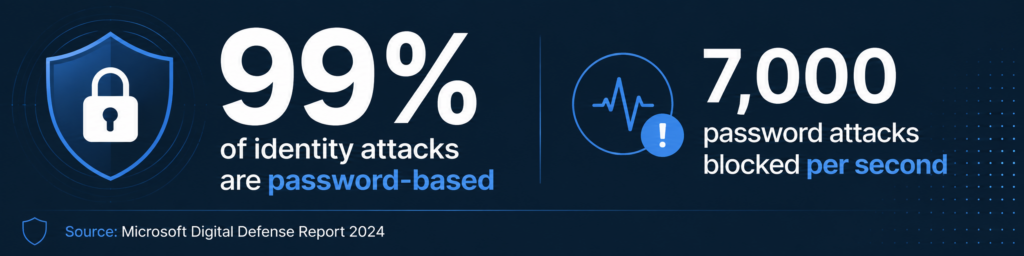
Microsoft has reported that more than 99% of the 600 million identity attacks it was seeing each day were password-based. They were blocking around 7,000 password attacks per second. That is a pretty good argument for changing the way we log in.
Passwords can be reused, guessed, stolen in a breach, or handed over to a fake login page. Passkeys remove a lot of that risk because there is no password to type, share, or reuse.
What Does Using a Passkey Look Like?
For most people, using a passkey feels surprisingly normal. You may be asked to use Face ID, your fingerprint, a PIN, or whatever you already use to unlock your device. The difference is what happens behind the scenes. Instead of sending a password to the website, your device uses the passkey to verify that you are who you say you are.
That can make the process feel almost too simple, especially if you’re used to typing a password and then entering a separate verification code. But that simplicity is part of the point.
A passkey is designed to make logging in easier for you and harder for someone trying to impersonate you.
Should I Create a Passkey When I’m Asked?
In most cases, yes. If a trusted website or app offers you the option to create a passkey, it is generally a safer way to sign in than relying on a password alone.
The main thing to pay attention to is where that passkey will be stored. On a personal device, that may be your phone, computer, or password manager. On a work account, your company may have its own rules about which devices or authentication methods you should use. And even as passkeys become more common, businesses will still rely on other security layers to protect devices, networks, and accounts.
And don’t panic if creating a passkey doesn’t immediately make your password disappear. Many services are still in transition, so you may continue to see passwords, MFA codes, or other sign-in options alongside passkeys for a while.
For most of us, the practical answer is pretty simple: when a service you trust offers a passkey, it’s worth using.
Passkeys are still new enough to feel unfamiliar, but the idea behind them is pretty simple: make logging in easier for legitimate users and much harder for criminals.
They won’t replace every password overnight, and they won’t eliminate the need for good security habits. But as more websites, apps, and businesses adopt them, you’re going to see that “Create a passkey?” prompt more often.
Now, at least, you’ll know what it’s asking and why saying yes is usually a good idea.